
A dehumidifier that runs but doesn’t collect water is usually not broken. The most common causes are a bucket that isn’t seated correctly (which trips the float switch), a humidity setting that’s already been met, or a room that’s too cold for the compressor to operate — most compressor dehumidifiers won’t run properly below roughly 41°F, and some stop as high as 65°F. Reseat the bucket firmly, lower the humidity setpoint, and check the room temperature before assuming anything’s actually failed.
This guide is cross-checked against GE Appliances’ dehumidifier guidance, ENERGY STAR’s dehumidifier program documentation, and the user manuals for Midea and Yaufey units. Error codes vary by model year, so check your own manual.
If you pull the bucket out and it’s bone dry after the unit has clearly been running, the likely explanation isn’t a bad compressor — it’s something simpler that stopped it from working, or a setting telling it not to. A fan pulls room air across a cold coil, moisture condenses on that coil, and it drips into the bucket. When water isn’t showing up, something in that chain has been interrupted, and most of the time it’s an easy fix you can do yourself in under ten minutes.
Table of Contents
Most Likely Causes of a Dehumidifier Not Collecting Water
Listed in the order they actually turn out to be the problem, based on the causes documented across major manufacturers’ own troubleshooting guides:
- The bucket isn’t seated correctly, or the float switch is stuck. Every compressor dehumidifier has a small float or sensor that detects the bucket’s position and fill level. If it’s even slightly out of alignment, most units treat that the same as “bucket full” or “bucket missing” and won’t run the compressor.
- The humidity setting has already been met. If the target is 50% and the room is already at 48%, the unit is doing exactly what it’s supposed to — sitting idle, with no water to collect because there’s little left in the air to pull out.
- The room is too cold for the compressor to run properly. Standard compressor dehumidifiers are designed for a working range of roughly 41°F to 90–95°F. Below that, the evaporator coil is prone to icing over, and many units restrict operation or run periodic auto-defrost cycles that pause the compressor.
- The air filter is dirty. A clogged filter restricts airflow across the coil, so less moisture ever reaches it to condense.
- The evaporator coil has frozen over. Usually a downstream result of causes 3 or 4 — a cold room or dirty filter both make ice buildup more likely, and an iced coil can’t condense more moisture until it thaws.
- The continuous drain hose is kinked, clogged, or set up wrong — only relevant if you’re using continuous drainage instead of the bucket. The unit may be collecting water fine; it’s just not making it out through the hose where you can see it.
- An actual compressor or refrigerant problem. The least common cause by far, but the one that needs a professional rather than a screwdriver.
How to Fix a Dehumidifier That’s Not Collecting Water
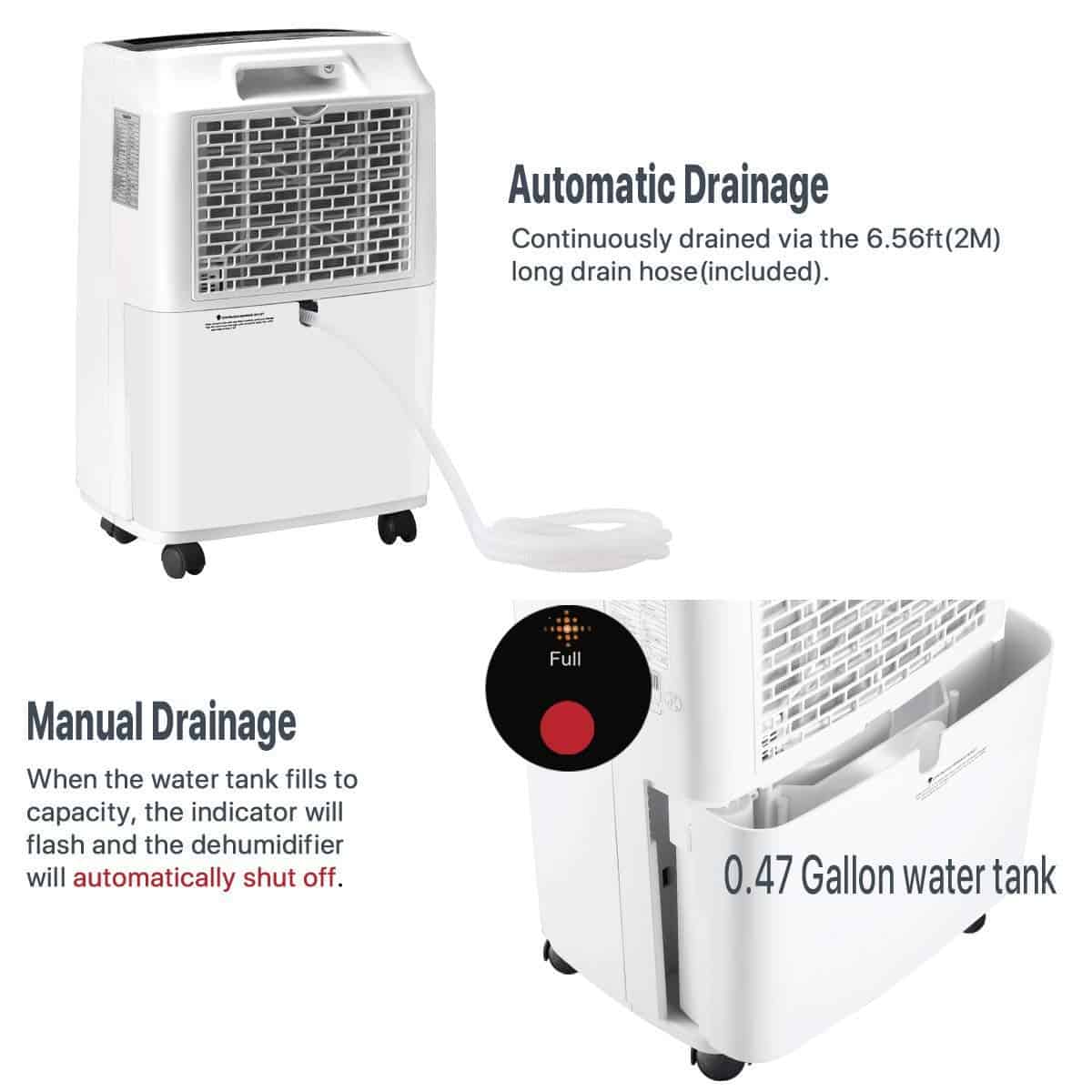
Reseat the Bucket and Check the Float Switch
This is the single most common cause across manufacturer troubleshooting documentation, and the first thing to check every time.
- Pull the bucket all the way out and set it aside.
- Look inside the bucket bay for a small plastic float arm or lever — the switch that senses the bucket’s position and fill level. Move it gently by hand; it should swing freely. If it’s stuck or gummed up, wipe the pivot point clean with a damp cloth.
- Check the bucket for a small internal float. Don’t remove it permanently — Yaufey and other manufacturers warn in their manuals that removing it stops the unit from sensing water level correctly.
- Slide the empty bucket back in slowly and evenly with both hands until it seats fully and squarely; on most models you’ll feel or hear a click.
- Power the unit back on and watch for a few minutes. A “bucket full” or error light should clear once the bucket is seated properly.
Check Your Humidity Setting
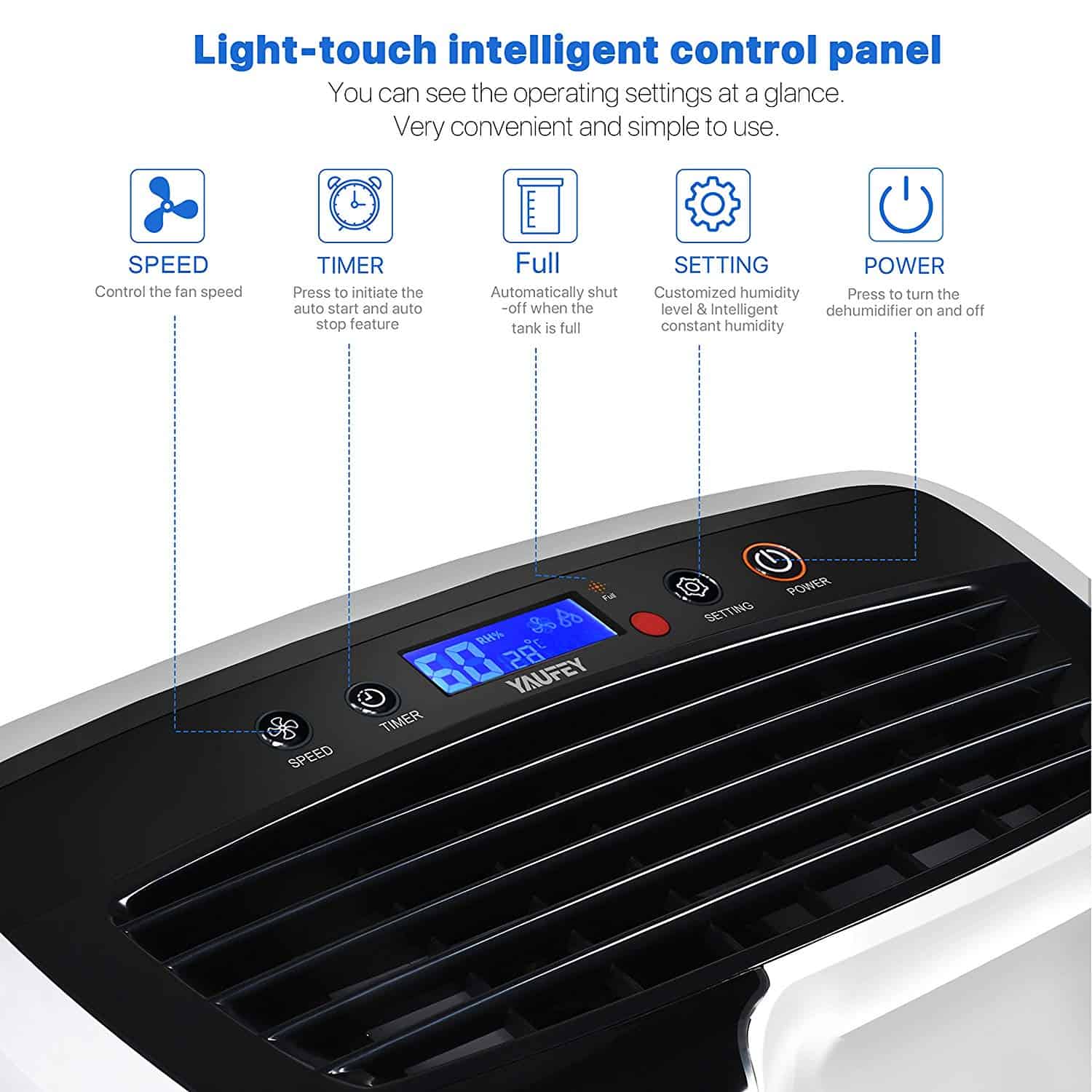
ENERGY STAR explains that a humidistat works like a thermostat for moisture: set a target relative humidity, and the compressor cycles on and off automatically to hold the room near that level. If the room is already at or below your target, the compressor has no reason to run — that’s the system working, not failing.
- Check the display or dial for the current humidity setpoint.
- Compare it to the room’s actual relative humidity, from the unit’s readout or a separate hygrometer.
- If the setpoint is close to or above the room’s current reading, lower it. ENERGY STAR recommends a 45–50% target for most homes.
- Confirm the mode is set to auto-humidity or dehumidify, not “fan only” — fan-only mode moves air but never runs the compressor, so it will never collect water by design.
Looking ahead, wetter springs and hotter summers in many regions will keep dehumidifiers running longer each year. The catch is that more run time means more wear, and the fan, filter and coils are the first parts to show it.
Warm Up the Room, or Move the Unit
Compressor dehumidifiers use the same refrigeration cycle as an air conditioner, which needs a minimum ambient temperature to work. GE Appliances’ operating guidance puts the ideal range between 41°F and 90°F, warning that below 41°F the coil can freeze badly enough to need hourly defrosting. Midea’s manual lists a 41°F–95°F design range for the models we’ve reviewed; Yaufey’s notes some models won’t start at all between 41°F and 68°F while auto-defrost runs.
- Check the actual room temperature, especially in a basement, garage, or crawl space — exactly the damp spaces people run dehumidifiers in, and the ones most likely to run cold overnight.
- If the room is below roughly 65°F and the unit has stopped running or cycles constantly through defrost, that’s your answer, not a defect.
- Where possible, raise the ambient temperature a few degrees, or relocate the unit to a warmer part of the space.
- If the space is reliably cold year-round, consider a desiccant dehumidifier — it uses a moisture-absorbing wheel instead of refrigeration coils and stays effective in much colder conditions.
Clean or Replace the Air Filter
- Locate the filter, usually a thin removable panel or mesh screen on the front or back grille, and slide or unclip it out.
- Vacuum it with a soft brush attachment, or rinse under lukewarm water if it’s washable (check your manual — not all filters are rinse-safe).
- Let it dry completely before reinstalling; a damp filter promotes mold growth inside the unit.
- Clean it roughly every two weeks during heavy-use months, more often in dusty basements or near pet hair.
Thaw a Frozen Evaporator Coil
If you see frost or ice on the coil behind the front panel, don’t chip at it. Most manufacturer manuals, including Midea’s, treat some frost as normal, clearing through an automatic defrost cycle where the compressor pauses and the fan keeps running until it melts.
- Turn the unit off, unplug it, and leave the bucket in place to catch meltwater while it thaws fully at room temperature (an hour or more depending on buildup).
- While it thaws, check the room temperature and clean the filter — the two most common triggers.
- Once thawed and the filter is clean, plug the unit back in and restart it.
- If the coil re-freezes within a day or two after ruling out temperature and a dirty filter, that points to a refrigerant or sensor problem — time to call a technician.
Fix a Kinked or Clogged Continuous Drain Hose
This only applies if you’ve plumbed the unit to drain continuously instead of using the bucket. The unit may be collecting water fine — it just isn’t reaching anywhere you can see it, which looks identical to “not collecting water” from the outside.
- Check the hose’s full length for kinks, especially where it bends sharply or gets pinched under the unit’s weight.
- Confirm it runs continuously downhill with no low spots where water or air can pool — manuals for continuous-drain and pump models warn an upward arch traps air and blocks flow.
- Detach both ends and flush the hose with water from a sink to clear mineral buildup or debris.
- Verify it’s seated tightly at the drain port — a loose connection leaks water around the fitting, pooling under the unit instead of at the far end.
The risk to watch is cheap units that fail early. Many low-cost compressor models are built to last a few seasons, and a unit that quietly stops pulling water can leave a basement damp for weeks, which is when mold starts. Take every error code and full-bucket alert seriously.
Midea and Yaufey Error Codes for No Water Collection
If your unit is one of the models we’ve reviewed, its display may already be telling you what’s wrong. These codes come straight from each brand’s official manuals:
- Midea — “P2”: per Midea’s manual for its Cube dehumidifiers (the line covered in our Midea 35 Pint review and Midea 22 Pint review), P2 means the bucket has reached its set fill level. Empty it and reseat it on the bucket.
- Midea — “Eb”: bucket removed or not in the correct position (pump models only). Reseat the bucket, and check that the pump hose hasn’t fallen out of place, which alone can keep the bucket from seating flush.
- Yaufey — “E1,” “E2,” or “E4”: per Yaufey’s manual, humidity sensor, defrost sensor, and temperature sensor errors (documented for the line that includes our Yaufey 30 Pint review). Unplug the unit, check for obstructions around the sensors, and restart; contact Yaufey support if the code returns.
Own a different brand? Don’t assume these codes carry over — meanings aren’t standardized across manufacturers. Check your own model’s manual for its code list.
When to Call a Professional Instead
Most “not collecting water” cases resolve with the steps above. A few signs mean it’s time to call an appliance repair technician instead:
- The compressor never runs at all even in a warm room with a properly seated bucket and a humidity setting below the room’s actual level. Fan runs, compressor never cycles on — that points to an electrical or compressor-start problem.
- The coil freezes repeatedly within a day or two of thawing, after ruling out a cold room and a dirty filter — a common sign of a low refrigerant charge or a failing sensor.
- Unusual noises — grinding, clicking, or a compressor that hums but never starts — point to a mechanical or electrical fault, not something a filter cleaning fixes.
- Any refrigerant-related issue. Diagnosing or recharging a sealed refrigerant circuit requires EPA Section 608 certification and proper recovery equipment. Don’t open it yourself — this is a licensed-technician job for legal and safety reasons.
- Any repair inside the compressor housing or internal wiring. Line-voltage electrical work carries real shock and fire risk if done incorrectly — leave it to a licensed technician.
When It’s Time to Replace, Not Repair
If your dehumidifier is several years old, has needed more than one repair, or was undersized for the room to begin with, replacement is often the more practical call. A unit that runs constantly but never keeps up with humidity in a larger or damper space is frequently just too small for the job, not malfunctioning — our Dehumidifier Pint Calculator can confirm in a couple of clicks whether your unit’s capacity matches your room. If it doesn’t, our guide to choosing the right size dehumidifier walks through sizing a replacement correctly.
Related Guides
Keep going with the dehumidifier buying guide, dehumidifiers for damp homes, bedroom dehumidifiers, basement air quality tips and dehumidifiers for basements.
What happens next: newer units add humidity sensors and phone alerts, so a full bucket or a frozen coil gets flagged before the damp builds up. If yours is a decade old and keeps failing, a new one may cost less than another repair.
Frequently Asked Questions
Why does your dehumidifier run but not collect any water?
Almost always one of three things: the bucket isn’t seated correctly and has tripped the float switch, the humidity setting is already at or below the room’s actual level, or the room is too cold for the compressor to run efficiently. Check all three before assuming the unit has failed.
What temperature is too cold for a dehumidifier to work?
Most compressor dehumidifiers operate between about 41°F and 90–95°F, per GE Appliances’ guidance and the official Midea and Yaufey manuals. Below roughly 41°F the coil is prone to freezing solid, and some models restrict startup between 41°F and 65–68°F during auto-defrost — a common reason a unit seems to stop working seasonally in a cold basement or garage.
Why does your dehumidifier say the bucket is full when it’s empty?
Almost always a float switch or seating problem, not a sensor failure. The bucket may be slightly out of alignment in its bay, or the internal float may be stuck, dirty, or missing. Reseat the bucket firmly until it clicks, and check that the float moves freely without removing it entirely.
Should you set your dehumidifier’s humidity lower to make it collect more water?
Not necessarily. ENERGY STAR recommends a 45–50% relative humidity target for most homes — enough to control moisture and mold risk without running the compressor harder than it needs to. Setting it much lower doesn’t meaningfully improve air quality and just adds compressor runtime.
How do you know if your dehumidifier is just too small for the room?
If it runs almost continuously and never quite catches up with humidity in a larger room or damp space, undersizing is a common cause that isn’t a malfunction at all. Our Dehumidifier Pint Calculator can quickly check whether your unit’s rated capacity actually matches your space.